Appearance
Project summary page
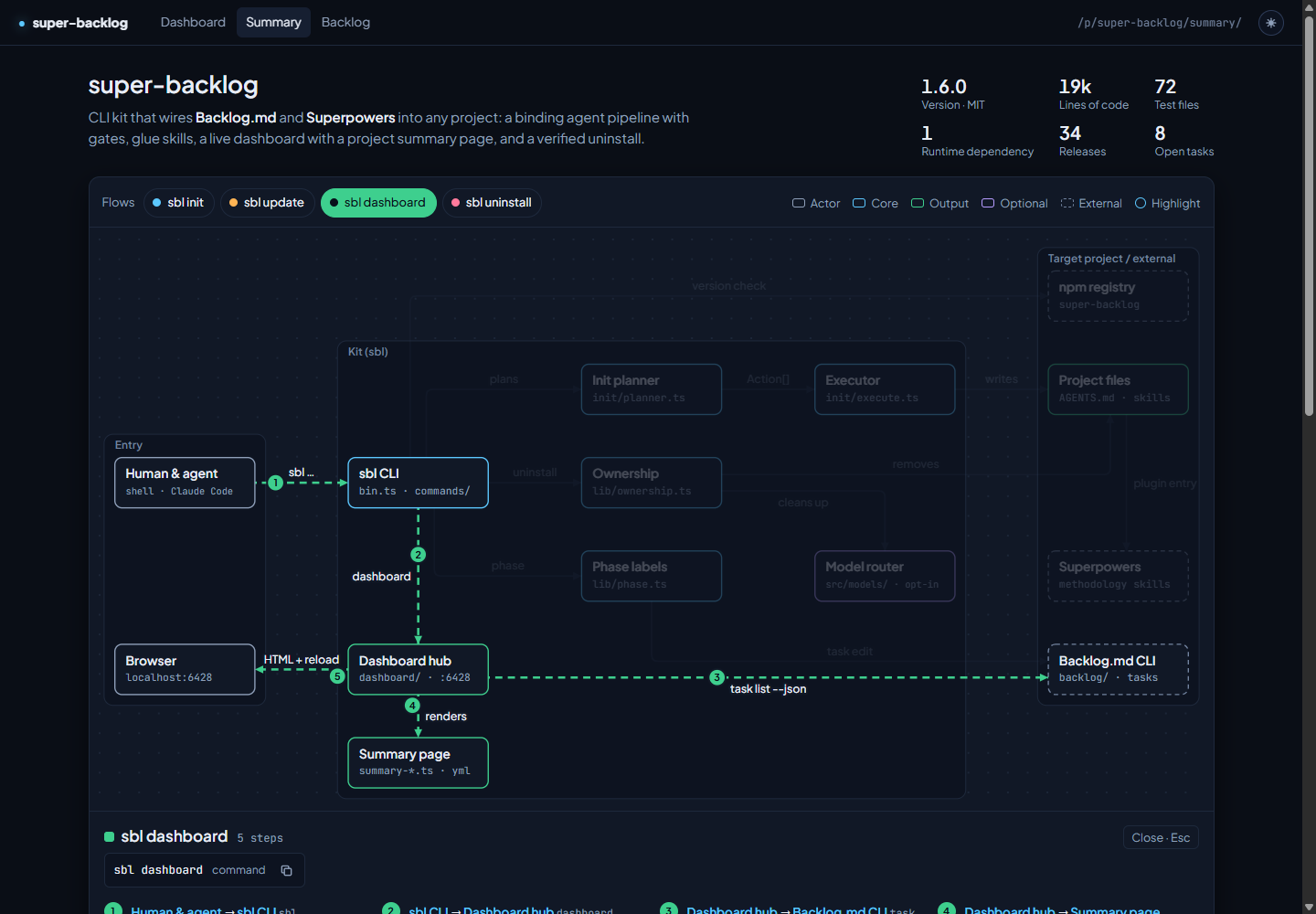
Every project registered with the dashboard hub gets a second page next to the dashboard: a management summary at /p/<slug>/summary/. The dashboard is about work in progress; the summary answers what the project is, how it is built and where the open work sits.
Open the page
bash
sbl dashboardUse the Summary tab under the project name in the dashboard sidebar, or open http://localhost:6428/p/<slug>/summary/ directly. The summary page has tabs back to the Dashboard and to the full-page Backlog browser. Both pages share the theme toggle and reload automatically when anything under backlog/ changes, including the architecture file. On Windows under Node 24 live reload is disabled due to a libuv bug, as for the dashboard (see Troubleshooting); refresh the browser tab manually.
What the page shows
The page combines two sources and says which block came from where (the collapsible Data source section at the bottom).
- Automatic facts, computed by the hub on every regenerate: name, version and license from
package.json,composer.jsonor a WordPress theme/plugin header; lines of code and test files; runtime and development dependencies; releases (git tags such asv1.2.0); CI workflows; open tasks from the backlog; commands from the manifest scripts. - Curated content from
backlog/docs/architecture.yml: a one-paragraph pitch, an architecture diagram with zones, components and labelled connections, flows that walk through the diagram step by step, numbered highlights, the tech stack with the role of each package, grouped commands, and a mapping from open tasks to components.
Without the curated file the page shows a reduced view: the facts, all open tasks, the manifest commands and the tech stack from the manifests, plus a notice that explains how to add the file.
Create the architecture file
Let your agent write it. sbl init and sbl update install the architecture-summary skill for Claude Code and OpenCode. Ask for "an architecture summary of this project"; the skill reads manifests, layout and tests, writes backlog/docs/architecture.yml, runs sbl doctor until the file is clean and stops for your review. While the file is missing, sbl init ends with a hint to ask your agent for it.
To check the file yourself:
bash
sbl doctorCheck 5 validates backlog/docs/architecture.yml. It is skipped when the file does not exist, fails with every problem and its path when the file is invalid, and warns when the file is valid but the diagram cannot be drawn cleanly (an edge without a straight or single-corner route, an overlapping label, a crossing, or too many connections on one side of a box). On a valid file, check 5 also counts the drift findings described in Keeping it current and points to sbl summary.
File format
A minimal file:
yaml
schema: 1
pitch: A **small** service that turns uploads into reports.
grid: { cols: 3, rows: 2 }
nodes:
  - { id: api, label: Upload API, kind: core, cell: [0, 0] }
  - { id: store, label: Report store, kind: output, cell: [2, 0] }
  - { id: mail, label: Mail relay, kind: external, cell: [2, 1] }
edges:
  - { from: api, to: store, label: writes }
- { from: store, to: mail, label: notifies }| Key | Required | Content |
|---|---|---|
schema | yes | Always 1. |
pitch | yes | At most 400 characters. **bold** is the only markup. |
grid | yes | { cols, rows }, 2 to 8 each. Nodes sit on grid cells. |
kinds | no | Map of kind id to { label, color, dashed? }; replaces the default kinds actor, core, output, optional, external. At most 6. |
zones | no | Up to 16 { label, cols: [c0, c1], rows: [r0, r1] }, inclusive cell ranges that may not overlap. |
nodes | yes | At least 2, at most 40: id, label (28 characters), kind, cell: [col, row], optional sub, purpose, why, files, commands ({ run, note? }). |
edges | yes | At least 1, at most 120: { from, to, label, text? }. Read as "from → label → to"; the arrow points at the target. |
flows | no | Up to 12 { id, label, color?, command?, text?, steps } with up to 12 steps each, every step from>to naming an existing edge. |
highlights | no | Up to 12 { node, title, text }; the list position is the badge number on the node, one badge per node. |
stack | no | Up to 40 { name, group, package?, version?, role?, nodes }. Versions resolve from package-lock.json or composer.lock unless version is set. |
commands | no | Map of group name to { run, note? } entries; at most 6 groups of 8. |
tasks | no | Map of task id to node id; shows open tasks on their component. |
Identifiers (id, kind keys, flow ids) match ^[a-z][a-z0-9-]{0,31}$. Colors are one of accent, ok, warn, violet, rose, muted, dim. The file may be at most 256 KB.
YAML subset
The file is YAML, read by a small built-in parser instead of a full YAML library:
- block mappings and sequences with two-space indentation;
- single-line flow collections
[a, b]and{ k: v }; a flow mapping may hold a flow sequence (cell: [0, 1]), but no deeper nesting; - plain, single-quoted and double-quoted scalars, integers,
true/false,>and|block scalars, and#comments.
Quote a value when it contains a comma inside { } or [ ], a colon followed by a space, or a #, when it ends with a colon, or when it starts with a dash and a space. A # starts a comment only after a space, also after a quoted value or a flow collection.
The parser rejects, with the line and column of the problem:
- tabs, anchors, aliases, tags, directives and multiple documents;
- empty entries in flow collections, such as
{ k: }or[a, , b]; - the keys
__proto__,constructorandprototype; - collections nested deeper than 32 levels.
Two values are converted instead of rejected: -0 reads as 0, and trailing spaces at the end of lines inside | and > blocks are removed.
Keeping it current
sbl summary compares the curated file with the code and the backlog:
bash
sbl summaryIt validates the file like doctor check 5, lists schema and layout warnings, and then lists four kinds of drift, each with its path in the file:
| Finding | Meaning |
|---|---|
missing-path | A path in a node's files no longer exists. An entry that ends in / must be a directory. |
done-task | A tasks entry maps a task that is Done. |
unknown-task | A tasks entry names a task the backlog no longer lists (archived, deleted or never created). |
stale-file | 20 or more commits changed the documented files since the file was last committed. |
stale-file counts from the last commit of backlog/docs/architecture.yml, so it clears once the refreshed file is committed.
The last line names the prompt to hand to your agent, for example "Run the architecture-summary skill to refresh backlog/docs/architecture.yml; sbl summary lists the drift findings." When the backlog CLI or git is unavailable, the affected checks are skipped and a note: line says why.
| Situation | Exit code |
|---|---|
| Valid file, no warnings, no drift | 0 |
| Missing file, warnings, or drift | 4 |
| Invalid file, or not inside a project | 1 |
sbl summary --check prints the same report without the prompt and uses the same exit codes, for CI and for the agent's end-of-pipeline check. The workflow block asks the agent to run it after a merge and to offer a refresh when it reports drift; the agent never runs the skill without your consent.
The summary page shows the same information as a banner with the number of findings and a copy button for the prompt.
When something is wrong
- No file: the reduced view plus a notice with a copy button for the agent prompt that creates the file.
- Drift: the full page plus a banner with the number of drift findings and a copy button for the refresh prompt;
sbl summarylists them. - Invalid file: the reduced view plus a notice that lists up to 20 problems as
path: message, for examplenodes[3].cell: outside grid 5x5. The page never fails to load. - Unexpected render error: the reduced view with the error message. The dashboard is never affected.
- Warnings only: the full page; the warnings appear in Data source.